Build an Authority Website That Helps Clients Choose You
A simple blueprint to plan your pages, show your work, and make contacting you easy.
"I've been following you on LinkedIn. Then I checked your website and thought we should talk."
A client said this on a discovery call.
He had looked at my services and testimonials. Before we spoke, he already had reasons to consider working with me.
Think about someone checking your work today. They might arrive through LinkedIn or a referral. What would they read next? Where would that lead?
Today, we'll plan those steps. You'll leave with a website layout you can give someone to build, including a one-page option.
I call this the Authority Website Blueprint.
An authority website helps potential clients understand your expertise, see proof, and decide whether to contact you.
Start with a choice
Imagine a consultant who helps owners prepare to sell their businesses or hand them over to family.
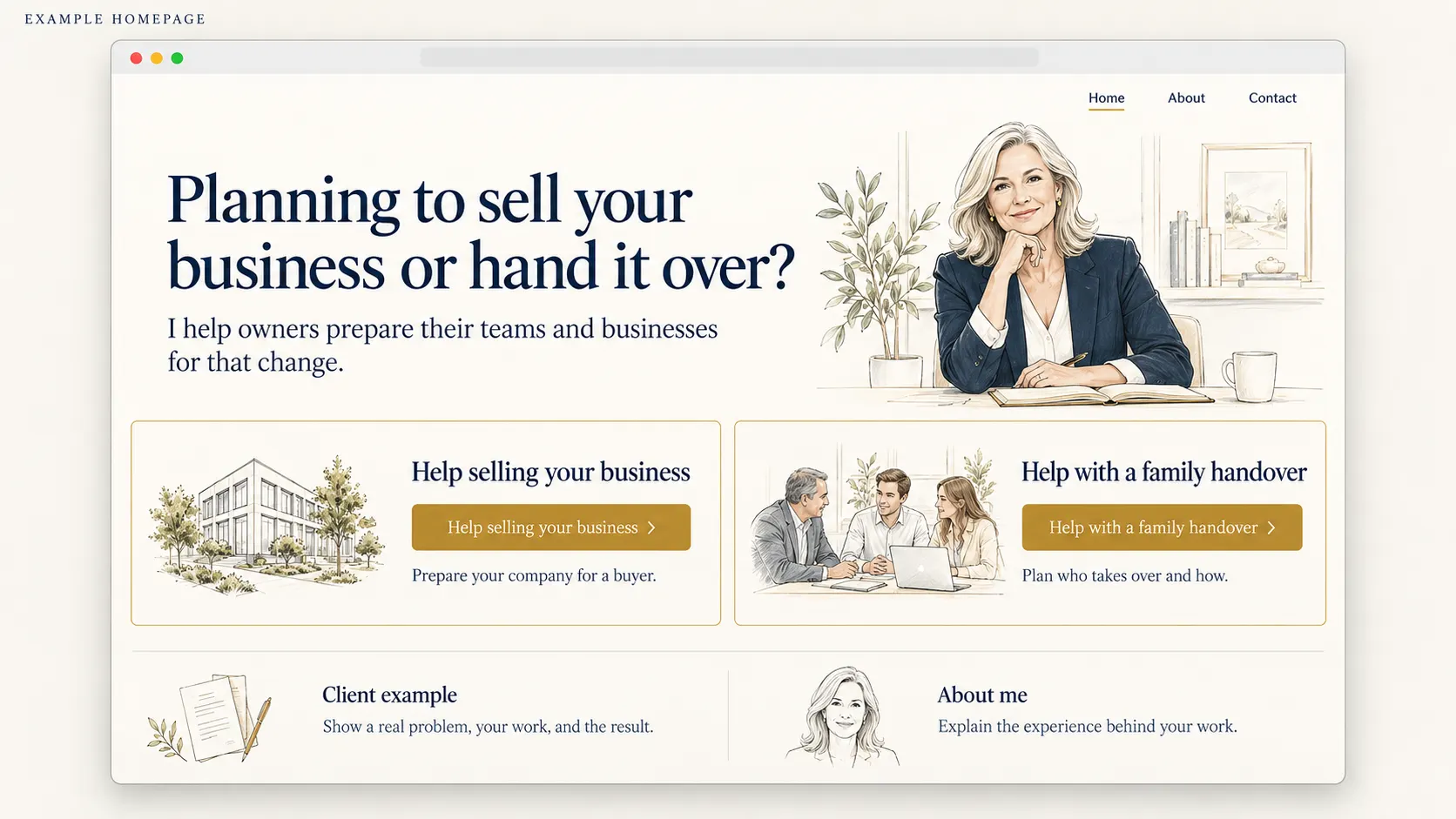
Her homepage could follow this order:
- Introduce the help. Her name, photo, and headline: "Planning to sell your business or hand it over?"
- Let visitors choose. Two buttons: "Help selling your business" and "Help with a family handover."
- Show a client example. Briefly describe relevant work and its result.
- Introduce her background. Add a short bio with an "About me" link.
Each service button opens its own page. Keep "Contact" in the menu for visitors already ready to talk.
An owner preparing a daughter to take over has different questions from someone seeking a buyer. Separate pages give each person a relevant explanation.
Make these choices reflect your current work. Otherwise, the website can reinforce an old Association Gap.
Build the page behind the button
Let's follow "Help selling your business."
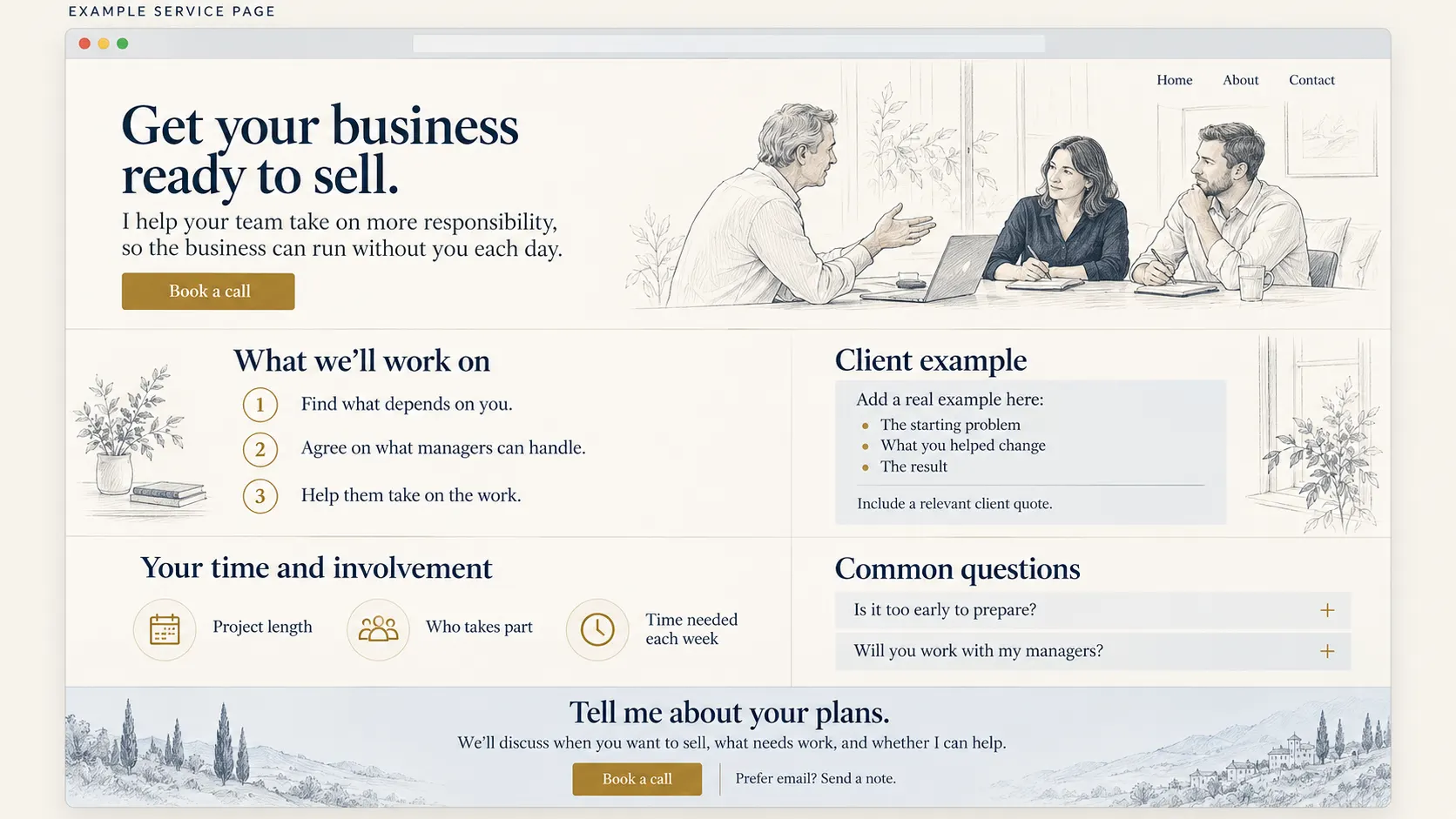
The service page opens with "Get your business ready to sell."
Below it:
"You want to sell in the next few years. But staff, customers, and key decisions still depend on you."
Then explain the help:
"I help your team take on more responsibility, so the business can run without you each day."
Now arrange the rest of the page.
What we'll work on
Show the steps: find what depends on the owner, agree on what managers can handle, then help them take it on.
How this helped one owner
Place a real client example here. Explain the starting problem, the consultant's decisions, and what changed. Include a relevant testimonial with permission.
For a simple way to write this example, use the four steps to show your expertise: the request, what you noticed, your choice and reason, and what followed.
Your time and involvement
Explain the project length, who takes part, and the time needed each week.
Common questions
Answer concerns such as "Is it too early to prepare?" and "Do you also find a buyer?" Make the scope clear.
Tell me about your plans
Explain the call: "We'll discuss when you want to sell, what needs work, and whether I can help."
Add a "Book a call" button that opens the calendar. Offer email as an alternative.
Keep the booking link near the top too. Returning visitors shouldn't have to read everything again.
The button makes a promise. The next page should keep it.
Why clear links matter
Nielsen Norman Group explains that people use a link's words and surrounding text to judge whether the next page will answer their question. Vague labels make that judgment harder.1
In this example, "Help selling your business" tells the owner more than "Explore." The page that opens then addresses the same need.
Give the other pages a job
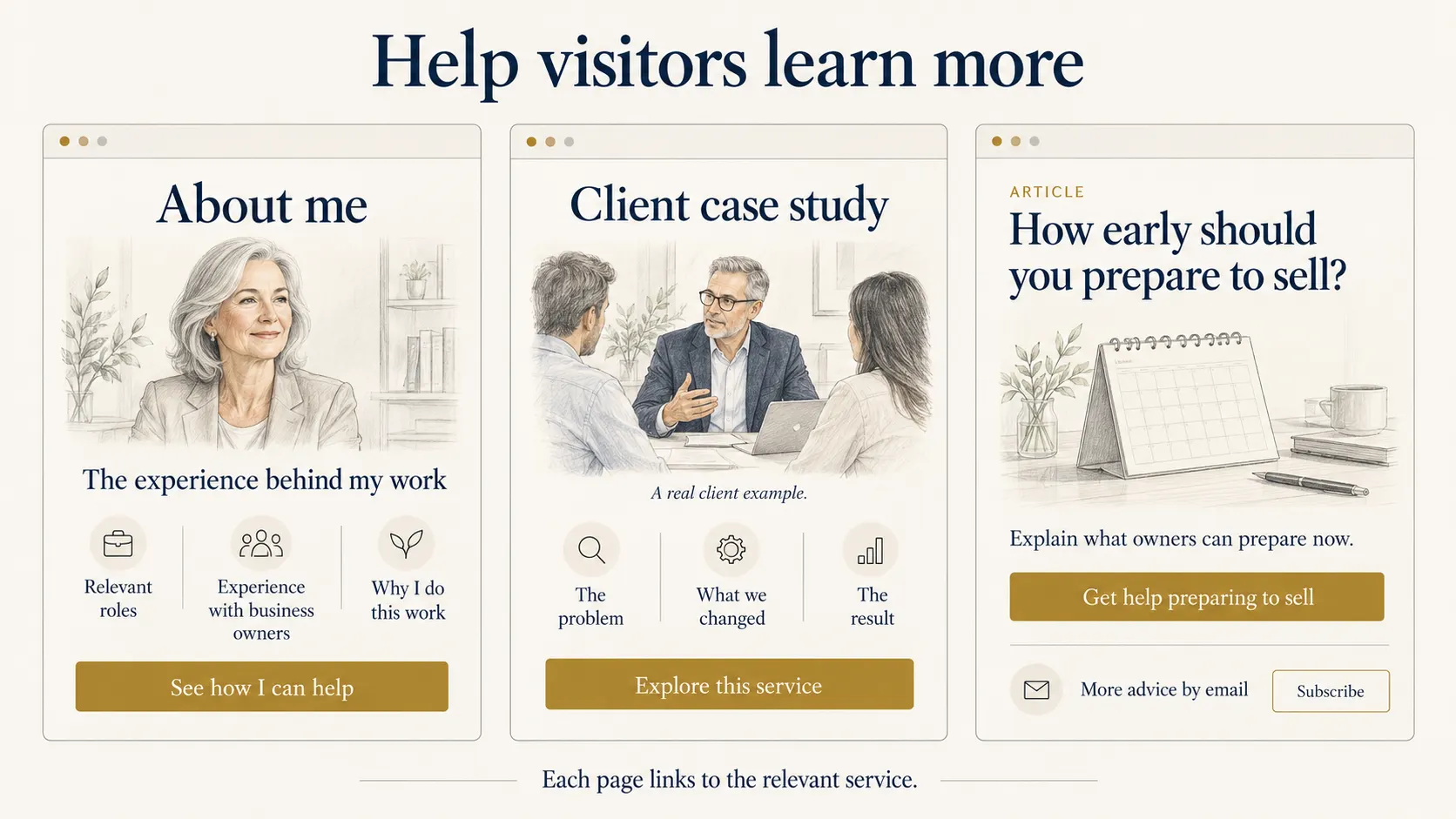
Your About page explains the experience behind your work. End with links to your services, so visitors can explore the help that interests them.
A case study page gives more detail than the short example on a service page. After the result, link to the service involved.
An article helps someone who wants to learn before hiring. Our consultant could write "How early should you prepare to sell?" Within it, she can explain when outside help becomes useful and link to her service.
If you have a newsletter, offer it after the article. Readers get a way to keep learning.
Unsure how much to share for free? Teach one useful lesson, then explain what further help someone can hire you for.
You don't need a large library before launching.
Could one page be enough?
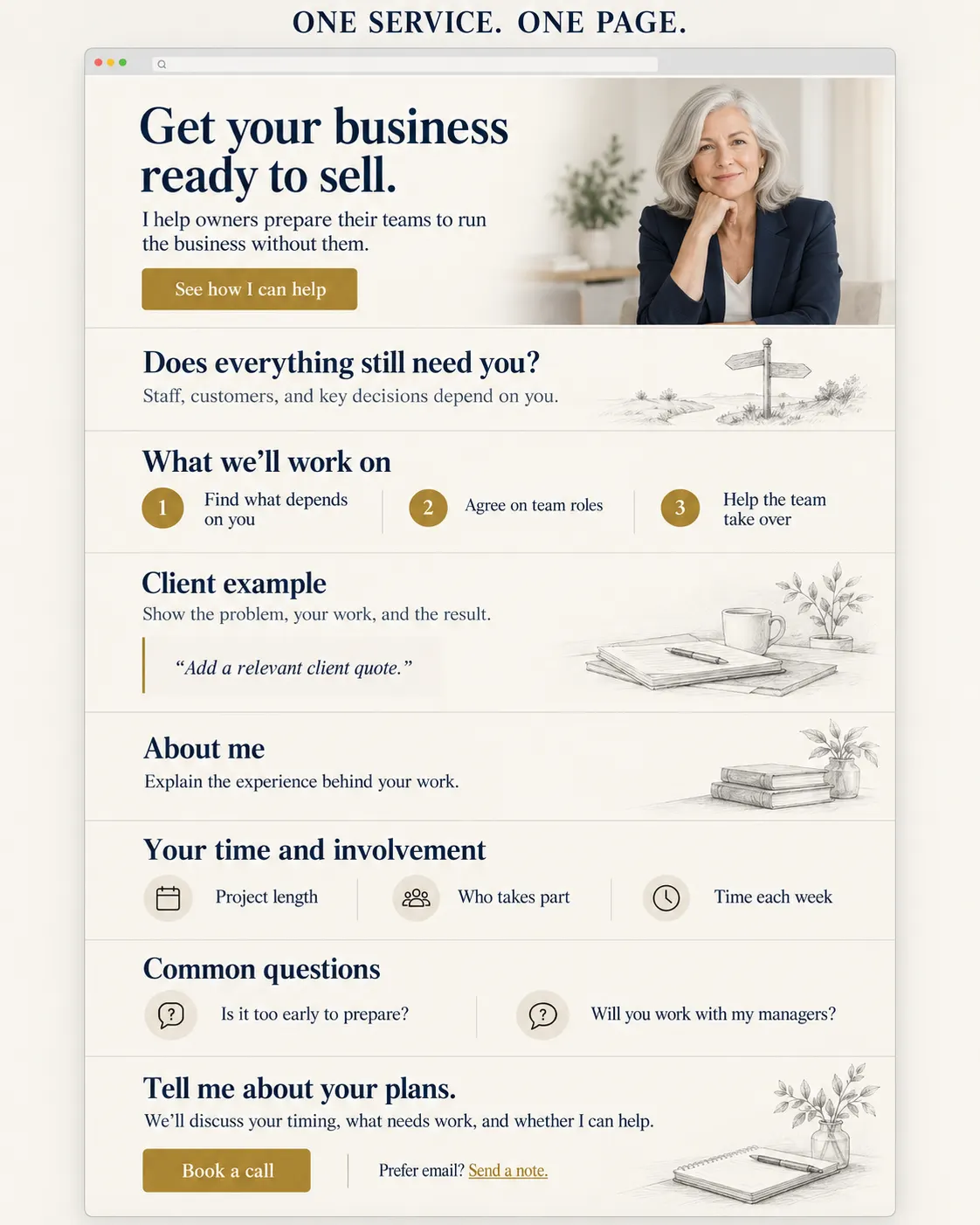
If you offer one main service, start with this order:
- Who you help and what you do.
- The problem you help solve.
- How the work happens.
- A relevant client example.
- Your background.
- The time and work involved.
- Common questions.
- An invitation to contact you.
At the top, "See how I can help" jumps to the work section. "Book a call" opens the calendar.
Separate pages become useful when different services need different explanations.
Before choosing fonts or colors, sketch your sections. Mark where every button goes.
That's a brief your website builder can use.
Questions before you build
Do I need a website if I use LinkedIn?
Your LinkedIn profile can help people choose you and contact you directly. A website gives them more room to explore each service, read client examples, and understand your approach.
Will this layout bring visitors?
The layout helps people assess your work once they arrive. Search, LinkedIn, referrals, and other sources can bring those visitors.
Must visitors follow every page in order?
No. Someone may arrive directly at a service page or article. Each page should make sense on its own and offer a relevant next step.
Want help turning this plan into your authority website? Let's talk about your goals, your services, and what the site needs to do.
For more practical ideas, subscribe to Authority Shift Letter.
References
- Budiu, R. (2020, February 2). Information Scent: How Users Decide Where to Go Next. Nielsen Norman Group. Read the research.
About the Authority Website Blueprint
The Authority Website Blueprint is Shiv Shenoy's practical approach to planning an expert's website. It connects homepage choices, service explanations, relevant proof, supporting pages, and contact steps. It offers a one-page option for experts with one main service.
About Shiv Shenoy
Shiv Shenoy is the founder of Authority Shift. He helps founders, CXOs, consultants, and experts turn their experience into authority and opportunities through positioning, LinkedIn, books, newsletters, articles, and websites.
Shiv Shenoy
Author & founder of Authority Shift